


Applicable Instructions
-
This article applies to: Gate iOS version
-
Preparation before operation: An email address that has not been registered before (such as Gmail, Outlook, 163 Mail, etc.)
-
Estimated time: 10 minutes
Objective
This article will guide you on how to register an Apple ID from outside Mainland China and install the Gate App from the App Store.
Steps
Step 1: Register a New Apple ID
-
Prepare an email account that has not been registered before.
-
Visit the Apple ID account creation page: https://appleid.apple.com/account
-
Fill in the following information on the registration page:
-
Country/Region: Select a region outside Mainland China (such as the United States, Hong Kong, etc.)
-
Email address: Enter the prepared email
-
Password: Set your account password
-
Phone number: Enter your commonly used phone number
-
-
Click [Continue].
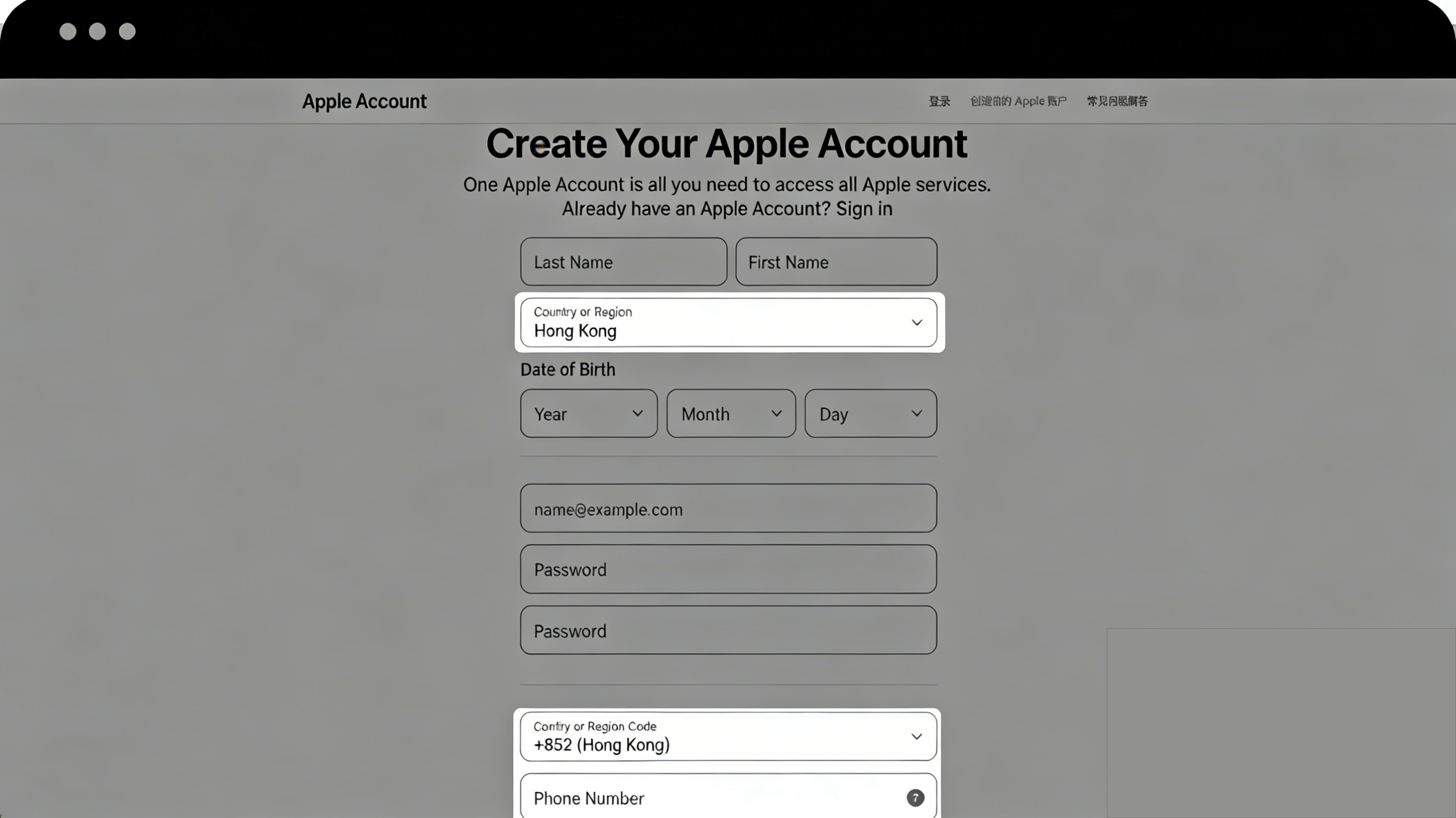
Step 2: Complete Email and Phone Verification
-
The system will send a verification code to your email and phone.
-
Enter the email verification code and phone verification code one by one.
-
After successful verification, your Apple ID registration is complete.
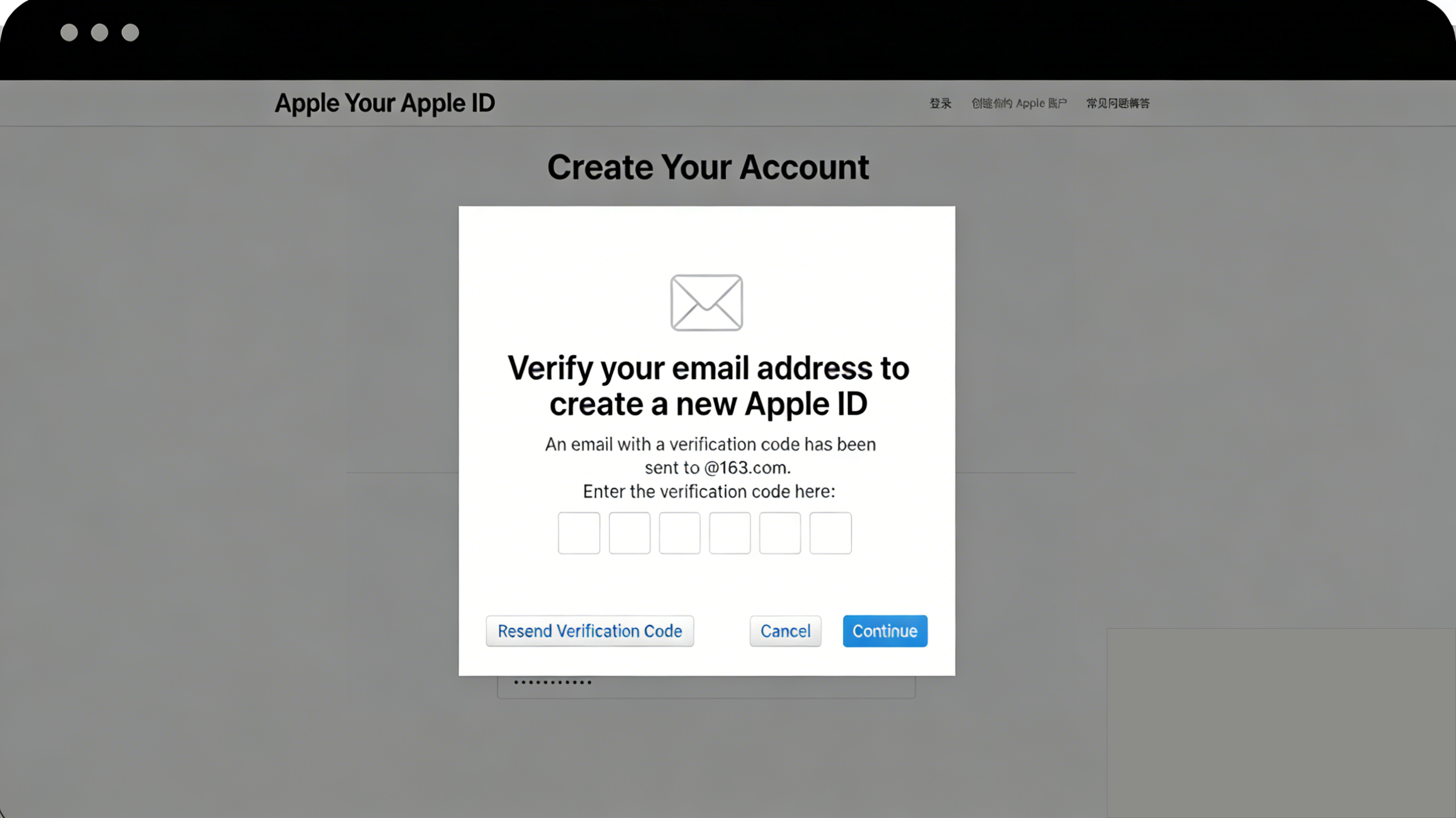
Step 3: Log In and Activate Your Apple ID
-
Open your iPhone and go to the App Store.
-
Tap the profile icon in the upper right corner and select [Sign Out of Current Account].
-
Log in using the newly registered Apple ID.
-
On your first login, the system will prompt "This Apple ID has not been used in the iTunes Store yet." Click [Review].
Step 4: Complete Account Information
-
Read and agree to the terms of service, then tap [Next] in the upper right corner.
-
On the payment method page, select [None].
-
Fill in the billing address information:
-
Name: Enter any name
-
Address: Use the real address format for the selected country/region (you can refer to an address generator: https://www.meiguodizhi.com)
-
City, State/Province, Postal Code: Fill in according to the address
-
Phone number: Enter a number in the format used in that region
-
-
Click [Next] to complete activation.
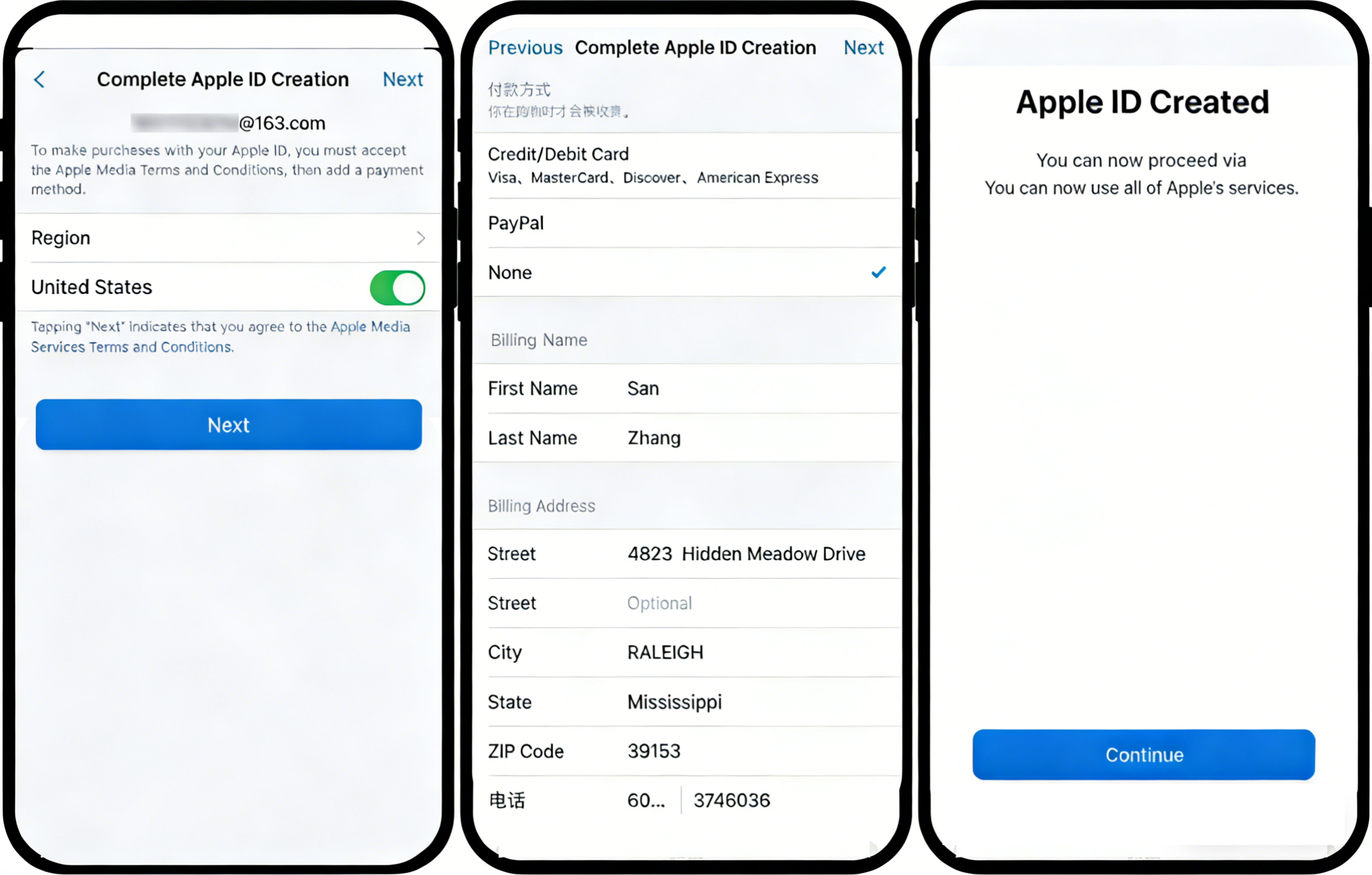
Step 5: Download the Gate App
-
After your account is successfully activated, enter "gate.io" or "Gate" in the App Store search bar.
-
Find the Gate App and tap [Get] or the cloud icon to download.
-
Once the download is complete, you can open and use the app.
Notes
-
When registering your Apple ID, you must select a country/region outside Mainland China. Otherwise, you will not be able to search for the Gate App.
-
The same Apple ID can be used to log in on multiple devices, but please make sure to keep your account secure.
-
If you do not wish to register a new Apple ID, you can change the country/region of your current account to one outside Mainland China. However, this may affect apps and subscription services you have already purchased.
-
If you still cannot install the app using the above methods, you can try using the PC version of the App installation tool (supports Windows and MacOS). For related tutorials, please refer to other articles in the Help Center.
Frequently Asked Questions
Q1: Why can’t I find the Gate App in the App Store?
A: Due to compliance requirements in certain regions, Apple IDs registered in Mainland China cannot search for the Gate App in the App Store. You need to use an Apple ID from outside Mainland China to search and download it.
Q2: Which country/region is best to select when registering an Apple ID?
A: We recommend choosing commonly used regions such as the United States or Hong Kong. The address format may vary depending on the region. You can use an address generator to obtain a properly formatted address.
Q3: What should I do if there is no "None" payment option when activating my account?
A: Make sure you are activating the new account by logging in for the first time via the App Store. If you log in directly in Settings, the "None" option may not appear. It is recommended to sign out and log in again through the App Store.
Disclaimer
The content provided herein is for reference and educational purposes only and does not constitute any financial, investment, trading, or legal advice, nor does it constitute an offer or solicitation to buy or sell any digital assets. Gate makes no express or implied representations or warranties regarding the accuracy, completeness, or timeliness of the information contained herein. Product features, interfaces, rules, and fee structures may be updated or adjusted at any time. Please refer to the latest announcements and the actual information displayed on the Gate platform for the most accurate details.
Digital asset investments involve significant risk, and prices may fluctuate substantially. You may lose the entire amount of your investment. Please make decisions cautiously based on your own financial situation and risk tolerance after fully understanding the associated risks. If necessary, you are advised to consult an independent professional financial or legal advisor.
For more information about potential risks, please refer to Gate's Risk Disclosure and User Agreement.
