


Participants
- User
- Fireblocks
- Gate (OES Module)
1. Workspace Initialization Process
(Handled by User & Fireblocks)
Step 1. User contacts Fireblocks – Request to create a Workspace
The user submits an application to Fireblocks, and Fireblocks creates a new workspace for the user.
Step 2. Fireblocks configures the Workspace as an OES Workspace
Fireblocks configures the workspace to be compatible with Gate’s OES mode and enables the required capabilities such as Delegate , Undelegate , Gas Fee payment , etc.
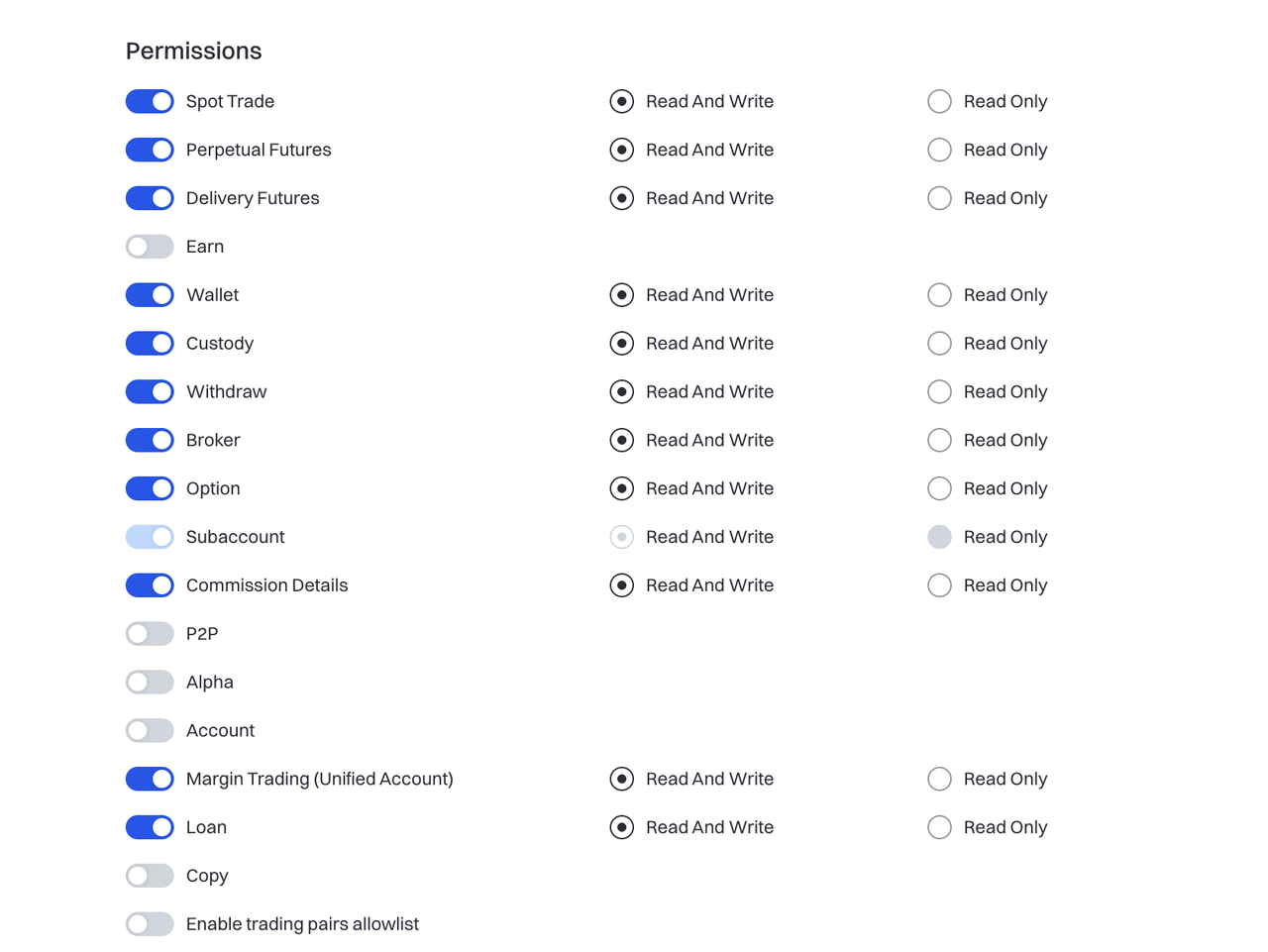
Step 3. User generates an API Key on Gate
The user logs into the Gate platform and generates an API key specifically for Fireblocks.
Requirements:
-
Must be created by the Gate main account .
-
The main account (including all sub-accounts) must meet both conditions:
-
No open positions
-
Zero balance
Step 4. User binds the Gate API Key to the Fireblocks Workspace
The user returns to Fireblocks and binds the Gate API key in the Workspace settings.
After this step, Fireblocks can interact with Gate on behalf of the user (delegate, settlement, etc.).
Step 5. User begins Delegating each supported currency (triggers wallet creation in Gate)
The user delegates each settlement currency supported by Fireblocks.
Delegate actions:
- Triggers Fireblocks → Gate request
- Gate automatically generates a mapped wallet address for that asset
Notes:
- The first delegation attempt will likely fail (wallet not yet initialized) → This error can be ignored
- Wait ~10 minutes , then delegate again to succeed
- Each supported settlement asset must be delegated at least once to activate the wallet
User Deposits & Gas Fee Collateral (Guarantee)
In the traditional OES model, both sides must deposit multi-million-dollar collateral in each other’s wallets.
In Fireblocks self-custody OES mode:
-
Gate does not require the user to deposit large collateral into Gate.
-
The user needs to maintain equivalent to 100 USDT worth of main-chain assets inside their own Fireblocks Workspace. (deglegate to gate)
-
Gate will freeze this small amount to cover settlement Gas fees.
-
Assets remain fully self-custodied inside Fireblocks and never leave the workspace.
-
The user needs to maintain equivalent to 50 USDT worth of main-chain assets inside their own Fireblocks Workspace. (without delegating it to gate)
-
In total 150 USDT of main chain collateral is needed
Advantage: Collateral requirement drops from millions → ~hundreds of USDT .
Main-Chain Asset Details
① User deposits main-chain assets into the Fireblocks Workspace
Each settlement chain must have its corresponding main-chain coin.
Examples:
- ERC → ETH
- BRC → BTC
- Solana → SOL
- Tron → TRX
② Delegate the amount of main-chain coins equivalent to 100 USDT to Gate
Gate will automatically freeze this amount as Gas Fee collateral .
③ Maintain Gate mapped wallet balance ≥ 100 USDT
This ensures sufficient Gas Fee availability.
④ Prepare an additional ~50 USDT of main-chain coins
(In the Fireblocks Workspace)
Used to cover multiple settlement transactions.
Supported Settlement Currencies & Main-Chain Requirements
| Settlement Currency | Chain | Gas fee token |
|---|---|---|
| BTC | BRC | BTC |
| ETH | ERC | ETH |
| OXT | ERC | ETH |
| FET | ERC | ETH |
| BOBA | ERC | ETH |
| ACX | ERC | ETH |
| SAFE | ERC | ETH |
| USDT(ERC) | ERC | ETH |
| SOL | Solana | SOL |
| TRX | Tron | TRX |
3. Settlement Preconditions & Failure Handling
3.1 Settlement Error Reporting by Gate
Gate can provide structured settlement error data:
But this data is given to fireblocks not to clients directly.
Information provided:
- Settlement currency
- Settlement amount
- Settlement network (ERC / BRC / Solana / Tron)
- Required main-chain asset
- Required main-chain amount
3.2 When a Settlement Fails (e.g., insufficient Gas Fee)
Gate returns a standardized error structure to Fireblocks.
However, Fireblocks does not yet fully surface these errors.
If the user encounters a settlement failure:
→ Please contact your API support representative for the detailed cause.
Example Error Response
{
"success": false,
"errors": [
{
"type": "gas_fee_insufficient",
"currency": "USDT",
"network": "ETH",
"message": "Missing gas fee",
"details": {
"available": "0",
"mainCoin": "ETH",
"required": "0.01"
},
"severity": "error"
}
],
"message": "Gas fee insufficient for settlement/withdrawal",
"data": {
"amount": "100.0",
"collateralId": "fb_test_2001",
"currency": "USDT",
"userId": 2001
}
}
Gate’s Logic
- Detects insufficient main-chain balance → returns an error
- User replenishes main-chain asset or increases Gate mapped wallet balance → retries settlement
Final End-to-End Process Summary
Initialization Phase
- User contacts Fireblocks
- Fireblocks creates a Workspace
- Fireblocks configures it as an OES Workspace
- User generates a Gate API Key
- User binds the API Key in Fireblocks
- User delegates each supported currency (first attempt fails → wait 10 min → retry)
Gas Fee Collateral Phase
- User deposits main-chain coins into Fireblocks Workspace
- User delegates 100 USDT equivalent main-chain coins to Gate (frozen)
- Maintain Gate mapped wallet balance ≥ 100 USDT
- Maintain ~50 USDT main-chain assets in Workspace for repeated settlements
Settlement Phase
- Gate calculates required main-chain gas and initiates settlement
- If gas is insufficient → Gate returns standardized error
- User replenishes gas → retry settlement
